Hello, if you have any need, please feel free to consult us, this is my wechat: wx91due
Organization of Digital Computers Lab
EECS112L
Lab 3 (100 Points)
1 Introduction
In this lab, we will compile some programs from C to MIPS assembly code and machine code. We will use the processor developed in the previous lab to run the machine code. In this lab you are going to submit two reports— Code Report and Simulation Report. More details on them in this lab manual and in the deliverables section.
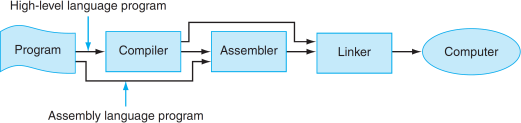
Figure 1: Assembly language either is written by a programmer or is the output of a compiler.
1.1 Compiler
A compiler translates a program written in a high-level language, such as C into an equivalent program in machine or assembly language. The high-level language is called the source language, and the compiler’s output is its target language.
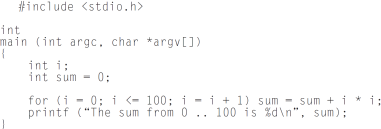
Figure 2: C Program Example.
1.2 Assembler
A tool called an assembler translates assembly language into binary instructions. Assemblers provide a friendlier representation than a computer’s 0s and 1s, which simplifies writing and reading programs. Symbolic names for operations and locations are one facet of this representation. Another facet is
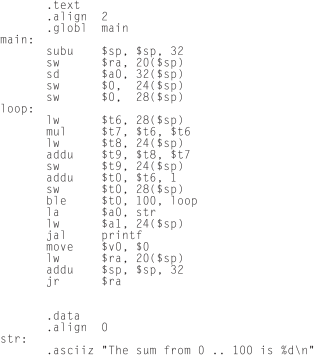
Figure 3: The same program as above, written in assembly.
The commands that start with periods are assembler directives. .text indicates that succeeding lines contain instructions. .data indicates that they contain data. .align n indicates that the items on the succeeding lines should be aligned on a 2n byte boundary. Hence, .align 2 means the next item should be on a word boundary. .globl main declares that main is a global symbol that should be visible to code stored in other files. Finally, .asciiz stores a null-terminated string in memory. programming facilities that increase a program’s clarity. For example, macros enable a programmer to extend the assembly language by defining new operations.
An assembler reads a single assembly language source file and produces an object file containing machine instructions and bookkeeping information that helps combine several object files into a program. Most programs consists of several files also called modules that are written, compiled, and assembled independently. A program may also use prewritten routines supplied in a program library. A module typically contains references to subroutines and data defined in other modules and in libraries.
The code in a module cannot be executed when it contains unresolved references to labels in other object files or libraries. Another tool, called a linker, combines a collection of object and library files into an executable file, which a computer can run.
An assembler translates a file of assembly language statements into a file of binary machine instruc- tions and binary data. The translation process has two major parts. The first step is to find memory locations with labels so that the relationship between symbolic names and addresses is known when instructions are translated.
The second step is to translate each assembly statement by combining the numeric equivalents of opcodes, register specifiers, and labels into a legal instruction. The assem- bler produces an output file, called an object file, which contains the machine instructions, data, and bookkeeping information.
1.3 Linker
Separate compilation permits a program to be split into pieces that are stored in diferent files. Each file contains a logically related collection of subroutines and data structures that form a module in a larger program.
A file can be compiled and assembled independently of other files, so changes to one module do not require recompiling the entire program. Separate compilation necessitates the additional step of linking to combine object files from separate modules and fixing their unresolved references.
The tool that merges these files is the linker. It performs three tasks:
• Searches the program libraries to find library routines used by the program
• Determines the memory locations that code from each module will occupy and relocates its in- structions by adjusting absolute references
• Resolves references among files
A linker’s first task is to ensure that a program contains no undefined labels. The linker matches the external symbols and unresolved references from a program’s files. An external symbol in one file resolves a reference from another file if both refer to a label with the same name. Unmatched references mean a symbol was used but not defined anywhere in the program.
Unresolved references at this stage in the linking process do not necessarily mean a programmer made a mistake.
The program could have referenced a library routine whose code was not in the object files passed to the linker. After matching symbols in the program, the linker searches the system’s program libraries to find predefined subroutines and data structures that the program references. The basic libraries contain routines that read and write data, allocate and deallocate memory, and perform numeric operations. Other libraries contain routines to access a database or manipulate terminal windows.
A program that references an unresolved symbol that is not in any library is erroneous and cannot be linked. When the program uses a library routine, the linker extracts the routine’s code from the library and incorporates it into the program text segment. This new routine, in turn, may depend on other library routines, so the linker continues to fetch other library routines until no external references are unresolved or a routine cannot be found.
If all external references are resolved, the linker next determines the memory locations that each module will occupy. Since the files were assembled in isolation, the assembler could not know where a module’s instructions or data would be placed relative to other modules. When the linker places a module in memory, all absolute references must be relocated to reflect its true location. Since the linker has relocation information that identifies all relocatable references, it can efficiently find and backpatch these references.
The linker produces an executable file that can run on a computer. Typically, this file has the same format as an object file, except that it contains no unresolved references or relocation information.
2 Processor Testing
Before proceeding in this lab, you will first correct the processor you developed in the previous lab. Use the testbench provided to verify your processor is functioning correctly. To run all the instructions and see the result you may need to hit “run all” button and then stop. The result are in the TCL console window. Another way is that you can go to Tools/Settings/Simulation then in the simulation tab change, xsim .simulate .runtime to 3000ns save this change and run the simulation again.
3 Compiling C Programs into MIPS Assembly and Machine Code
3.1 Program 1
|
f = ( g + h ) - ( i + j ) ; |
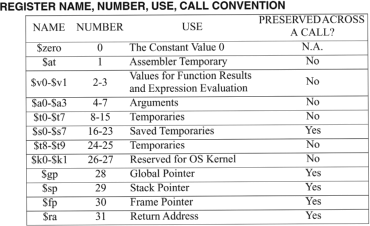
Figure 4: For the following problems, refer to this table to translate variable names to register numbers.
The variables f, g, h, i, and j are assigned to the registers $s1, $s2, $s3, $s4 and $s0, respectively. Use $t0 and $t1 as temporary registers.
1. (10 points) What MIPS assembly code might a C compiler produce? Include the code in your code report (Checkout the deliverables section). For your assembly code only use the instructions that we implemented in our single cycle processor.
2. (10 points) From the assembly code, what machine code might a MIPS assembler produce? Include the code in your code report.
3. (5 points) Load the machine code into your MIPS processor instruction memory run the simulation in Vivado. Include the waveform and explain your simulation results in your simulation report. All registers initially contain 0. To test your code you need to first assign some values to the input registers.
3.2 Program 2
|
i f ( i ≠ j ) f = g + h ; e l se f = g - h ; |
The variables f,g,h,i, j are assigned to the registers $s1, $s2, $s3, $s4, and $s0.
1. (10 points) What MIPS assembly code might a C compiler produce? Include the code in your code report. For your assembly code only use the instructions that we implemented in our single cycle processor.
2. (10 points) From the assembly code, what machine code might a MIPS assembler produce? Include the code in your code report.
3. (5 points) Load the machine code into your MIPS processor instruction memory run the simulation in Vivado. Include the waveform and explain the simulation results in your simulation report. To test your code you need to first assign some values to the input registers.
3.3 Program 3
|
while ( save [ i ] ≠ k ) i += 1 ; |
The variable k is assigned to the register $s1, base address of array save is inside register $s2, and the value i is saved in temporary register $t0.
1. (10 points) What MIPS assembly code might a C compiler produce? Include the code in your code report. For your assembly code only use the instructions that we implemented in our single cycle processor. For example we didn’t implement the “branch not equal” instruction, so you need to use other instructions to write this code.
2. (10 points) From the assembly code, what machine code might a MIPS assembler produce? Include the code in your code report.
3. (5 points) Load the machine code into your MIPS processor instruction memory run the simulation in Vivado. Include the waveform and explain your simulation results in your simulation report. To test your code you need to first assign some values to the input registers.
3.4 Program 4
|
s l l $t0 , $a1 , 2 add $t0 , $a0 , $t0 lw $t1 , 0 ( $t0 ) lw $t2 , 4 ( $t0 ) sw $t2 , 0 ( $t0 ) sw $t1 , 4 ( $t0 ) |
1. (10 points) From the assembly code, what machine code might a MIPS assembler produce? Include the code in your code report.
2. (10 points) Load the machine code into your MIPS processor instruction memory run the simulation in Vivado. Include the waveform and explain your simulation results in your simulation report.
3. (5 points) What does this program do? Write the C code for this assembly program. You can use any variable names but explain them in the comments in your code report.
4 Assignment Deliverables
Your submission should include one zip folder with the following files:
• Code Report: A text file report should be in txt format. Follow the rules in the template file provided with this lab.
• Simulation Report: A report in a pdf format for the waveforms with your explanation of the waveform and comments on the simulation.