Hello, if you have any need, please feel free to consult us, this is my wechat: wx91due
CDS1001 Assignment
In this assignment, we will develop an Elevator Management System (EMS) that simulates the operations of elevators within a building. The system will manage multiple elevators, each with specific constraints such as servicing floors and capacity limits.
Key Features:
• Elevator Configuration: we will define the properties of each elevator, including its unique identifier, maximum passenger capacity, and the floors it can service.
• User Interaction: The system will collect user requests for elevator service, specifying the floor of origin, destination floor, and direction (upwards or downwards).
• Elevator Operation Simulation: The EMS will simulate the movement of elevators in
response to user requests, displaying the status of each elevator and how it operates over time.
Let’s kick-off the illustration by a simple example:
Suppose we first construct a single elevator without any capacity and servicing floors constraints. Assume that we have FOUR users and they request the elevators in the following ways:
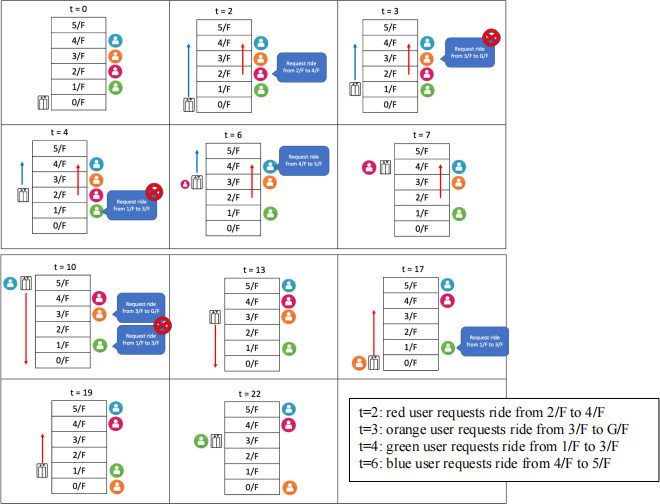
The full explanations are provided on the next page. Please proceed to the next page, where the complete explanations will be given.
Explanations:
Initially, we have the rules:
- The elevator begins its position at the ground floor (0/F), and the time unit t starts at zero (i.e., t=0).
- Moving up or down one floor takes 1 time unit.
- The boarding and disembarking process for each passenger also takes 1 time unit.
Elevator Passenger Pickup and Dropoff Sequence:
1. At t=2, the red user requests a ride from 2/F to 4/F.
2. At t=3, the elevator is moving up to the 1st floor.
3. At t=3, the orange user requests a ride from 3/F to G/F, but the elevator is moving in the opposite direction, so it cannot serve this request at the moment.
4. At t=4, the elevator is moving up to the 2nd floor. The green user requests a ride from 1/F to 3/F, but the elevator has already passed the 1st floor, so it cannot process this request now. Additionally, the red user has now boarded the elevator at the 2nd floor, which requires 1 time unit.
5. At t=6, the elevator resumes moving up to the 3rd floor. The blue user requests a ride from 4/F to 5/F, which is in the same direction as the elevator's movement, and can be processed after offloading the red user.
6. At t=7, the elevator offloads the red user at 4/F and then onboards the blue user. This takes two time units to perform the on-boarding and off-loading.
7. At t=10, the elevator resumes moving up and offloads the blue user at 5/F. After offloading the blue user, the elevator becomes idle and can now process the orange user's request.
8. At t=13, the elevator picks up the orange user from 3/F and drops them off at G/F at t=17.
9. At t=19, the elevator picks up the green user from 1/F and drops them off at 3/F at t=22.
The same analogy applies when we have multiple elevators. However, we need to determine which elevator should serve each request. For each request, we need to compute the cost for each elevator to decide which one to assign the request to.
For each request, we have the following parameters:
• s: source floor
• d: destination floor
• t: time unit when the request is sent
Elevators can be in one of three states: idle (I), moving upward (U), or moving downward (D).
The elevator system allows for configuring each elevator to serve a specific set of floors, as well as imposing a capacity constraint on the number of passengers an elevator can carry at a time.
To simplify the complexity, we assume that the input requests will not have any cross-elevator rides. For example, if Elevator 1 only serves floors 2-3, and Elevator 2 serves floors 4-10, there will be no request from the 2nd floor to the 5th floor. All elevators will be located at floor 1 (1/F) initially instead of floor 0 (0/F).
Before processing the schedule, we need to check whether the elevators can serve all the requested floors. If any of the requested floors are not covered by the configured elevators, an error message will be prompted to the administrator.
In addition, for the capacity constraint, we will assign each request to the elevator with the lowest computed cost. However, we will not assign a new job to an elevator if the number of jobs assigned to that elevator has already reached its capacity limit.
The cost calculation for each elevator to serve a request is as follows:
1. Idle Elevator:
• If the elevator is in the idle state, the cost is simply the absolute distance between the elevator's current position and the source floor s.
2. Upward Moving Elevator:
• If the request is going upwards, and the request's source location s is higher than the
elevator's current position, the cost is the absolute distance between the elevator's current position and s, plus the number of on-board and offloading passengers that the elevator needs to process at floors lower than s.
3. Downward Moving Elevator:
• If the request is going downwards, and the request's source location s is lower than the
elevator's current position, the cost is the absolute distance between the elevator's current position and s, plus the number of on-board and offloading passengers that the elevator needs to process at floors higher than s.
It's important to note that non-idle elevators will only process requests in the same direction as their current movement. If there are no available elevators at the moment, the system will postpone the processing of such requests to a later time point.
The goal is to assign each request to the elevator with the lowest computed cost, in order to optimize the overall efficiency of the elevator system.
The Elevator Management System (EMS) has SEVEN main functionalities:
1. Elevators Construction:
- Define the number of elevators.
- For each elevator, configure the serving floors and the capacity.
2. Print Elevators:
- Print out the details of the available elevators.
3. Collect User Requests and Form a Schedule:
- Collect user inputs for the source floor, destination floor, and time point of each request.
4. Read Schedules:
- Read in the saved schedule from a text file.
5. Sort User Requests:
- Sort the user requests by time point, and break ties by the source location.
6. Find the Suitable Elevator:
- Determine the best elevator to serve each request based on the computed cost.
- Filter out the elevators that have reached their capacity limit.
7. Process Schedule:
- Simulate the elevators' movements and process the schedule.
Note that NO Global variable and NO external modules are allowed in this assignment