Hello, if you have any need, please feel free to consult us, this is my wechat: wx91due
Math 9 — Course Information
Introduction to Programming for Numerical Analysis
Summer Session 1 2024
Course Overview
Welcome to Math 9! This course will serve as a first-introduction to computer programming and numerical analysis through the languages of MATLAB and Python. Math 9 is unique in that we assume no prior pro-gramming experience, and will introduce everything you need to get started with coding. Knowing how to program has increasingly become a requirement for many career paths after graduation, and this is espe-cially true for those pursuing the data science concentration. Even for those in other specializations, having a strong foundation in Math 9 material will provide valuable experience in critical thinking and problem solving. Math 9 is a prerequisite for Math 10, which will introduce fundamentals of data science in Python.
Lectures: MWF 9:00am–10:50am over Zoom (link on Canvas)
Discussion Sections: MWF 11:00am–11:50am over Zoom (link on Canvas)
Student Hours: Student hours will be held each week by both the instructor and the TA. The times and Zoom information are TBD, but will be updated on Canvas once available.
Software, Technology, and Textbook: There is no required textbook for this course, and all relevant lecture materials and notes will be made available to you for free through our Canvas page. On your per-sonal computer, you will have to install the needed software yourself. MATLAB is available for free for all UCI students, and a link to the website with the download will be included on Canvas. For the Python portion of the course, you have the option of downloading Anaconda Navigator or Miniconda (also for free). Helpful installation videos for Python are linked on Canvas. The instructional team will also provide special student hours to help troubleshoot any issues with getting set up.
Ed Discussion: Ed Discussion is an online Q&A forum where you can ask questions about the course and material, or provide help to your classmates. All code-related questions should be posted on Ed Discussion, instead of being sent via email. Email should be used for any personal or private concerns.
Instructional Team
Instructor: Yasmeen Abd-el-Baki [ jæs."min QAb.dë."bA.qi] [she/they], [email protected]
Feel free to call me by my first name, Yasmeen. "
Teaching Assistant: Jessica Bennett ["ÃE.sI.k@ "bE.nEt][they/them], [email protected]
Grades
Our section of Math 9 will use Specifications Grading instead of a traditional grading system. We will discuss what this looks like in-depth during some of our lectures, but in short, what this means is that your grade in Math 9 will be based on your ability to show mastery of the learning outcomes listed below — there are no points, and you will have multiple opportunities to demonstrate your understanding. In Figure 1 below you will find a picture of the grade scale for this course, and what you need to do to achieve each of the possible letter grades. Here is a link to an app that you can use to calculate your grade as the summer session progresses. Reach out to Yasmeen if you see any bugs!
A passing grade in Math 9 means that students are able to demonstrate mastery of all of the following EO’s. Which letter grade you receive will depend on how many of the GO’s you are able to pass.
Essential Outcomes
EO1— Display and plot various types of data
EO2— Examine and contrast different data structures
EO3— Implement and iterate through for/while loops
EO4— Implement logical operations
EO5— Write functions
EO6— Simulate and interpret random events
General Outcomes
GOMa1— Manipulating vectors and arrays using MATLAB-specific indexing
GOMa2— Writing functions and scripts and identifying key differences
GOMa3— Writing and implementing function handles
GOMa4— Implement the bisect method and interpret results
GOMa5— Simulate a random walk and compute expected distance
GOPy1— Implement core NumPy keywords/features (e.g. axis, boolean masking, broadcasting)
GOPy2— Compare and contrast Python-specific data structures (e.g. dictionaries, lists)
GOPy3— Write Pythonic code (f-strings, list comprehension, lambda functions)
GOPy4— Implement and analyze Newton’s Method
GOPy5— Process images with PIL/Pillow
Note: It’s totally normal for specifications grading to seem strange or overwhelming at first! Usually, grades are computed at the end of the quarter and the process instructors use to curve the class are not shared with students. In our Math 9 class the grade scale is set from the start, and you know exactly how you will be graded and where you stand in the class at all times. Everyone is able to get an A, if they want, and there is no incentive to compete with your classmates. Feel free to reach out to Yasmeen if you have any questions, or would like to set up a meeting to talk more about specifications grading.
Outcome Quizzes
Outcome Quizzes will be one of many opportunities to demonstrate mastery of our Essential and General Outcomes. Each week, typically on Monday, a number of quizzes will be released, each corresponding to an outcome we’ve covered in class so far. Quizzes can be taken on your own schedule and are due by the next
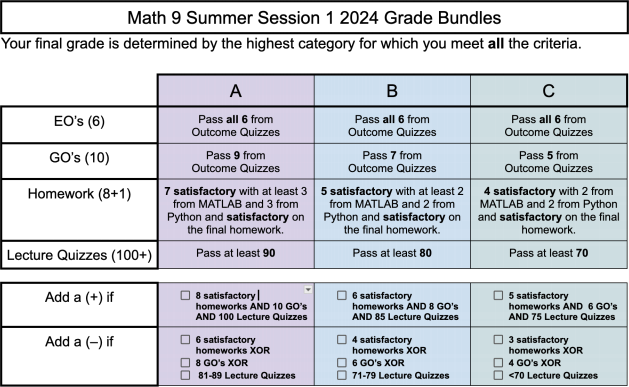
Figure 1: If you do not meet the minimum criteria for a C−, you will receive a D if at least 3 EO’s have been passed. Otherwise an F will be given.
Monday at the beginning of class. You only need to answer questions which correspond to outcomes that you currently need or want. Because Essential Outcomes are needed to pass the course, every week will have at least some questions corresponding to these outcomes. You will know ahead of time exactly which outcomes will appear for the week. You are allowed to use any course notes or videos, as well as course software, to help answer the questions on the quiz, but you may not collaborate with anyone else or search on the internet for help.
Checkpoint Weeks
“Checkpoint Weeks” will take the place of traditional midterm weeks. There will be a total of two (2) check-point weeks, with one (1) during Week 3, and one (1) during Week 5. During Week 3, all MATLAB specific outcomes will have corresponding quizzes released and during Week 5, all Python specific outcomes will have corresponding quizzes released. As with typical outcome quizzes, you only need to answer questions which correspond to outcomes that you need or want. After Week 3, we will not release anymore quizzes corresponding to MATLAB outcomes (likewise for Python outcome quizzes after Week 5).
Homework
There will be a total of eight (8) homework assignments in Math 9. You are allowed to collaborate with up to two (2) other students in the class, and can turn in the same assignment, so long as the names of all of your collaborators appear at the top of the assignment. To get credit on a homework assignment, you must pass at least 80% of the questions. There will also be one “creative homework” assigned in place of a final project. Collaboration is not permitted on this assignment, and part of passing Math 9 is turning in a creative homework that meets the minimum requirements.
Lecture Quizzes
Each week there will be approximately twenty (20) short Canvas quizzes corresponding to content that we covered in lecture. These quizzes are not meant to be stressful or difficult; they are meant as a quick check of your understanding of a given lecture. You will have three (3) attempts per quiz. Lecture quizzes should be completed by Monday at the beginning of lecture of each week.
Token Economy
Tokens are a no-questions-asked way of revising and resubmitting work and getting certain deadlines ex-tended. Each student in the class starts out with four (4) tokens, and can earn more through completing optional assignments on Canvas. Below is a table of what tokens can be traded for.
Item Cost in Tokens
24 Hour Homework Extension 2
72 Hour Homework Extension 4
Resubmit a Homework 4
Revise 1 GO for credit 5
Revise 1 EO for credit 6
To use tokens, fill out a Token Request Form on Canvas.