Hello, if you have any need, please feel free to consult us, this is my wechat: wx91due
CSSE2010/CSSE7201 AVR Project
Semester 2, 2024 - Version 1.00 (30/09/2024)
Weighting: 20% (100 marks)
Objective
As part of the assessment for this course, you are required to undertake an AVR project which will test you against some of the more practical learning objectives of the course, namely your C programming skills applied to the ATmega324A microcontroller.
You are required to modify a program to implement additional features. The program is a basic template of the game “Sokoban” (described in detail on page 3) and has very basic functionality. It will present a start screen upon launch, respond to push button presses or a terminal input “s”/“S” to start the game, then display the first level which contains a map of game objects and a flashing player icon. You can add features such as moving the player, game logic, pausing, audio etc. The various features have different levels of difficulty and will each contribute a certain number of marks.
Don’t Panic
While this is a long project specification, there’s not actually that much code to write! You’ve been provided with approximately 2000 lines of code to start with! You are not expected to fully understand all of the provided code, and several intro/getting started videos are available on Blackboard, which contains a demonstration of some of the expected functionality to be implemented and walks through setting the project up with the provided base code, as well as how to submit.
Note
The requirements in this document take priority over anything shown in the feature demonstration videos.
Grading Note
As described in the course profile, if you do not score at least 10% on this AVR project (before any penalty) then your course grade will be capped at a 3 (i.e., you will fail the course). If you do not obtain at least 50% on this AVR project (before any penalty), then your course grade will be capped at a 5. Your AVR project mark (after any penalty) will count 20% towards your final course grade.
This project has 17 features, broken into three tiers, and marks are distributed as follows:
Available Marks Max Mark
Tier A 54 50
Tier B 34 30
Tier C 24 20
112 100
This means if you implement all features of tier A and score full marks for each feature, you will receive 54 marks, however it will be capped at 50 when the grade of your project is calculated. This also means that you do not need to score full marks for each feature to be able to achieve 100% for the project.
Code Style and Restrictions
There is no restriction on your code, as long as your code compiles with Microchip Studio installed on the lab computers. No marks are awarded nor deducted in the marking criteria for code style, however you are advised to follow a good code style for your own benefit and to make it easier for course staff to assist you. You may freely create and add .c/.h files, as well as include additional header files (eg: string.h, ctype.h) from the C Standard Library to any source file using #include.
You may use any C language feature (e.g., switch statements, structures, pointers), provided that they are C99 compliant and supported by the GCC compiler used by Microchip Studio.
Provided Code
You have been provided with some base code as a starting point for this project. You should import the base code files into a project, and you will be working on adding features to the provided base code. There is a documentation of the base code on Blackboard which you should read prior to implementing the features and refer to while working on the project. A setting up video on Blackboard shows how to create a new project and get the base code up and running.
Note
When you create a new project in Microchip Studio, a main.c file will automatically be created, containing an empty main() function. project.c also contains a main() function, but Microchip Studio will preferentially look for the main() function in the main.c file, if it exists. Please ensure that you delete the main.c file so that Microchip Studio will look for the main() function in project.c.
Sokoban Description
This AVR project involves creating a replica of the classic game “Sokoban”. Sokoban is a classic puzzle video game in which the player pushes boxes around in a warehouse, aiming to get them to designated storage locations.
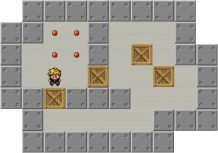
There are 4 main object types in a game of Sokoban – player, wall, box and target. The player and boxes are movable, while walls and targets are not. In the original game, the player may push a box in 4 directions – left, right, up and down, provided that there is no wall or other boxes behind the box. 2 boxes cannot be pushed together. The player can move to empty or target squares, but not to walls or boxes (boxes can be pushed, but player and box can never coexist on the same square). The level is complete when all boxes have been pushed onto the targets by the player. The number of boxes is always equal to the number of targets.
Note
You may play the Sokoban game online at https://sokoban.info/ to gain a better understanding of the game. Please note however the version of Sokoban described in this project specification has differences compared to online version, and you must implement the game according to this specification.
For this AVR implementation, the warehouse is represented using the 16x8 LED matrix:
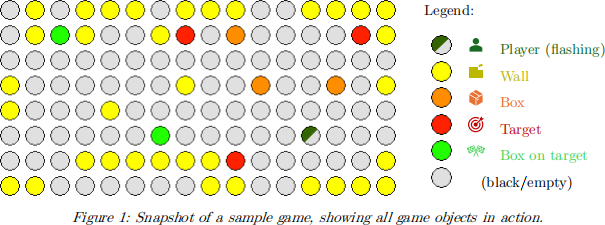
The flashing player icon is rendered in this document as  , meaning that particular pixel of the LED matrix flashes between dark green and black. Likewise,
  means a pixel which flashes between dark green and red (i.e., player on a target).
Initial Operation
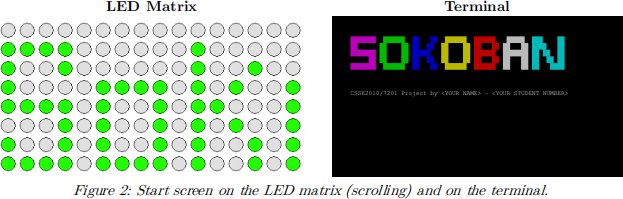
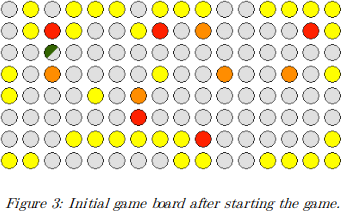
The provided program has very limited functionality. It will display a start screen (see Figure 2) which detects the rising edge on the push buttons B0, B1, B2 and B3, as well as the input terminal character “s”/“S”. Pressing any of these will start a game of Sokoban and take you to the initial game board as illustrated in Figure 3.
Once started, the provided program is capable of detecting a rising edge on the push button B0, but no action when the button is pressed (this will need to be implemented as part of the Move Player with Push Buttons feature).
Terminal Layout
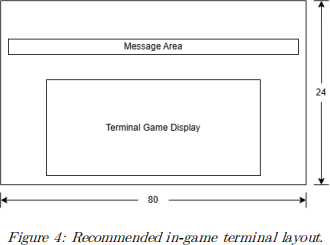
The terminal used for marking will have 80 columns and 24 rows, and you are advised to keep this in mind when implementing the project. During gameplay, a message area one row in height is defined on the terminal, for displaying messages.